What's New
- PDF Exporting Enhancements.
- New Keyboard Shortcuts for Task Completion Rate
- Direct Task Name Editing on Gantt Chart
- New Taskbar Title Options
PDF Exporting Enhancements

-
Option to Matches UI Task Column Width in PDF Outline
By default, task column widths in the PDF outline are fixed. Enabling this option mirrors the column widths from the user interface.
-
Match Taskbar Shape to User Interface
The PDF taskbar shape now matches the user interface (controllable in App Preferences).
-
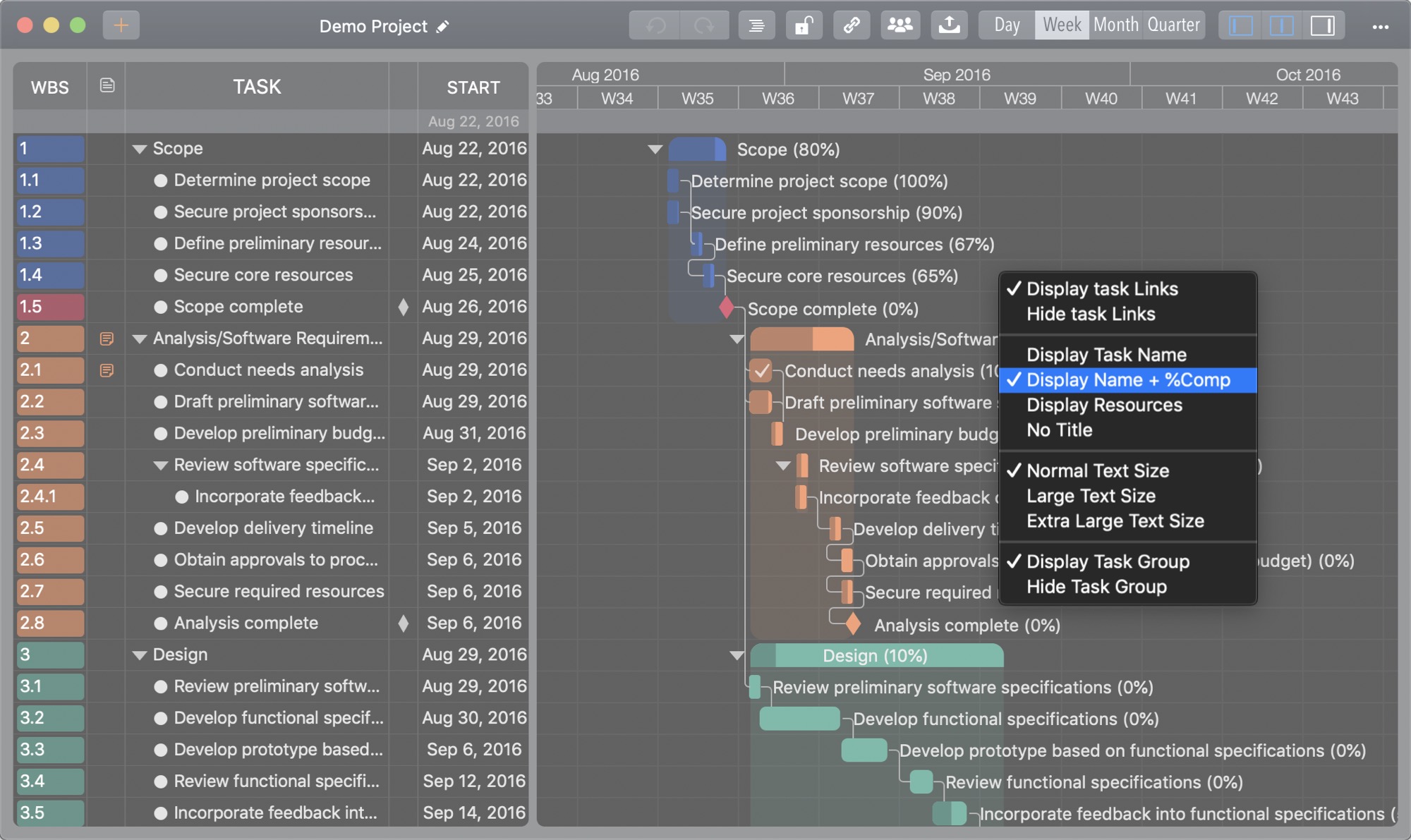
Taskbar Title Options
- Task Name
- Task Name and %Complete
- Resource
- None
- "Extra +" (Extra Large Plus Font Size) Option
- Fixed Banner Image Display Bug
New keyboard shortcuts
New keyboard shortcuts to change task completion rate

- ⌥ 0...9(Alt + 0...9) to set task % Complete to 0%...90%
- ⌥↩(Alt + Return) to set task % Complete to 100%
- ⌘`(Command + `) to set task % Complete to 100%
- ⌘D(Command + D) to set task % Complete to 100%
Direct task name editing
⇧ double-click(Shift + Mouse Double-Click) to edit the task name on the chart panel directly

New taskbar display option