
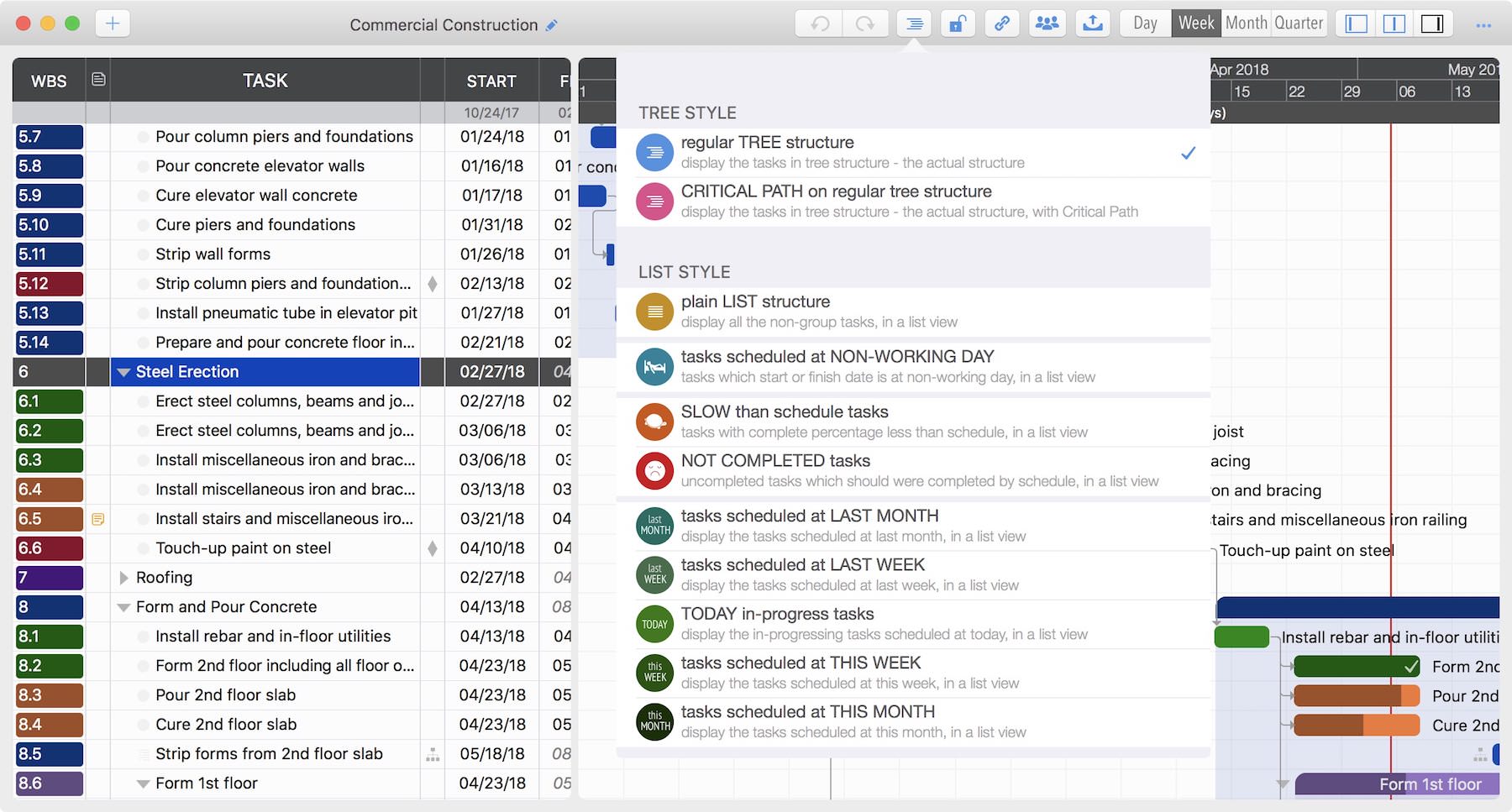
In addition to the standard tree structure, the app supports displaying all tasks as a list.
- Tasks within sub-projects are included in the list.
- Only actual tasks are displayed; task groups are excluded.
Several pre-defined lists with filtering are available to support various project management processes.
Best Practice: Pre-defined lists simplify reviews. For example, during a weekly meeting, use the "Tasks Scheduled for THIS WEEK" list, or check delayed tasks using the "BEHIND Schedule" list.
Notes
Note: The undo history is reset after changing display styles, sorting, or filtering. Since the List view is a representation, not the actual data structure, undo operations could compromise data integrity.
Project Operations
Project Properties
Task Maintenance
- Task Structure
- Task Fields
- Create Task
- Insert Task
- Remove Task
- Indent and Outdent
- Copy / Paste Task
- Repeat Task
- Split Task
- Maintain Properties on Gantt
- Maintain Properties on Outline
- Property Updating Panel
- Task Link Maintenance
- Task URL Maintenance
- Date, Work and Costs Baseline
- Critical Path
- Seach & Replace
Efficent Maintenance
Task Display
- Tree, and List with sorting and filtering
Customizations
Alarm
Synchronization
Team Collaboration
Partical Exporting