
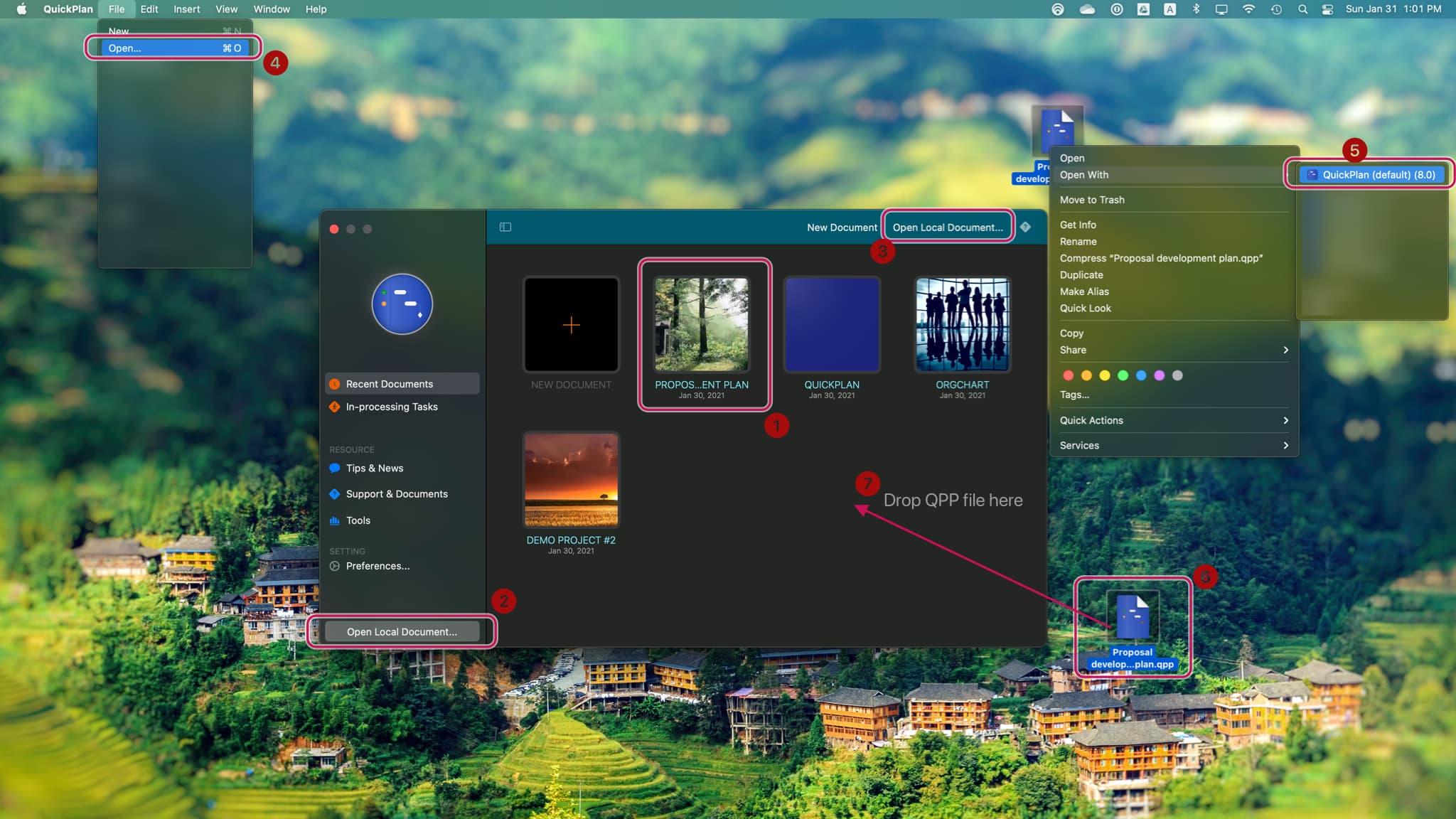
QuickPlan offers various flexible methods to open a project.
- Click a tile in the Recent Documents view of the Welcome Window.
- Click the "Open Local Document..." button in the Welcome Window sidebar.
- Click the "Open Local Document..." button on the Welcome Window toolbar.
- Click "Open..." in the App Menu.
- Use the context menu by right-clicking a project file.
- Double-click on a project file.
- Drop a project file into the Recent Documents view of the Welcome Window.
Project Operations
Project Properties
Task Maintenance
- Task Structure
- Task Fields
- Create Task
- Insert Task
- Remove Task
- Indent and Outdent
- Copy / Paste Task
- Repeat Task
- Split Task
- Maintain Properties on Gantt
- Maintain Properties on Outline
- Property Updating Panel
- Task Link Maintenance
- Task URL Maintenance
- Date, Work and Costs Baseline
- Critical Path
- Seach & Replace
Efficent Maintenance
Task Display
Customizations
Alarm
Synchronization
Team Collaboration
Partical Exporting