
Insert a New Task Below the Selected Task
-
Select "New Task to Next" from the context menu, or click the "+" button on the Updating Panel toolbar.
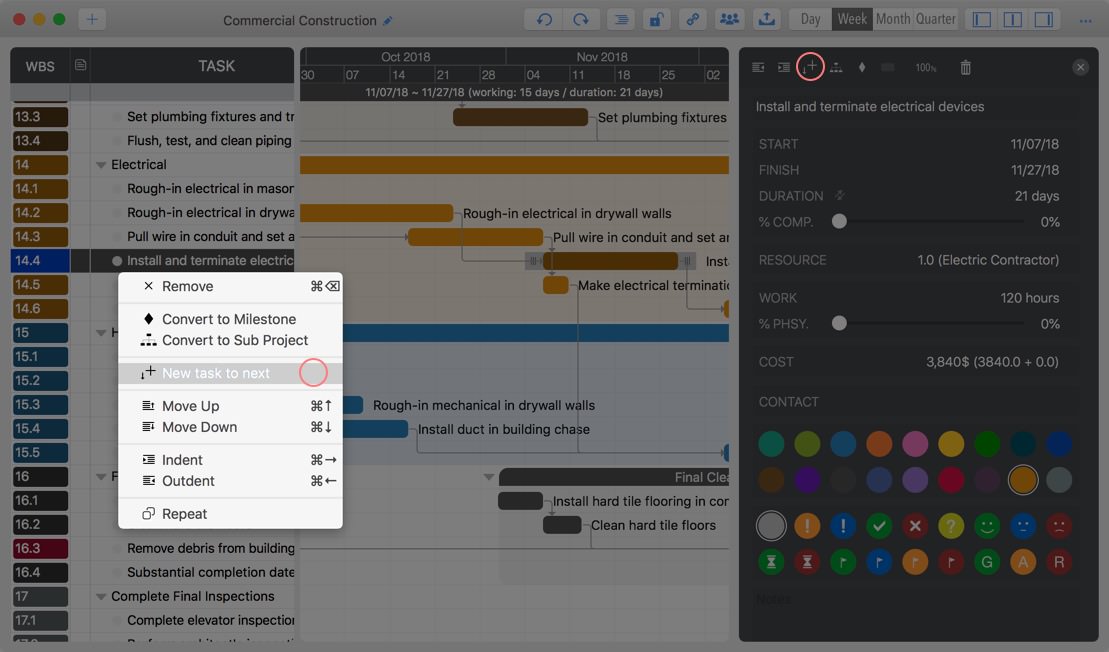
- Or select a task and press "Option" + "+" (or "Option" + "=") to insert a task below.
How Do I Insert a Task ABOVE the Selected Task?
- Insert a New Task Below the Selected Task first
- Then, use "Command" + "Mouse Move Up/Down" to reorder the task.
Project Operations
Project Properties
Task Maintenance
- Task Structure
- Task Fields
- Create Task
- Insert Task
- Remove Task
- Indent and Outdent
- Copy / Paste Task
- Repeat Task
- Split Task
- Maintain Properties on Gantt
- Maintain Properties on Outline
- Property Updating Panel
- Task Link Maintenance
- Task URL Maintenance
- Date, Work and Costs Baseline
- Critical Path
- Seach & Replace
Efficent Maintenance
Task Display
Customizations
Alarm
Synchronization
Team Collaboration
Partical Exporting