
On iPad, please enable Files integration in the app preferences.
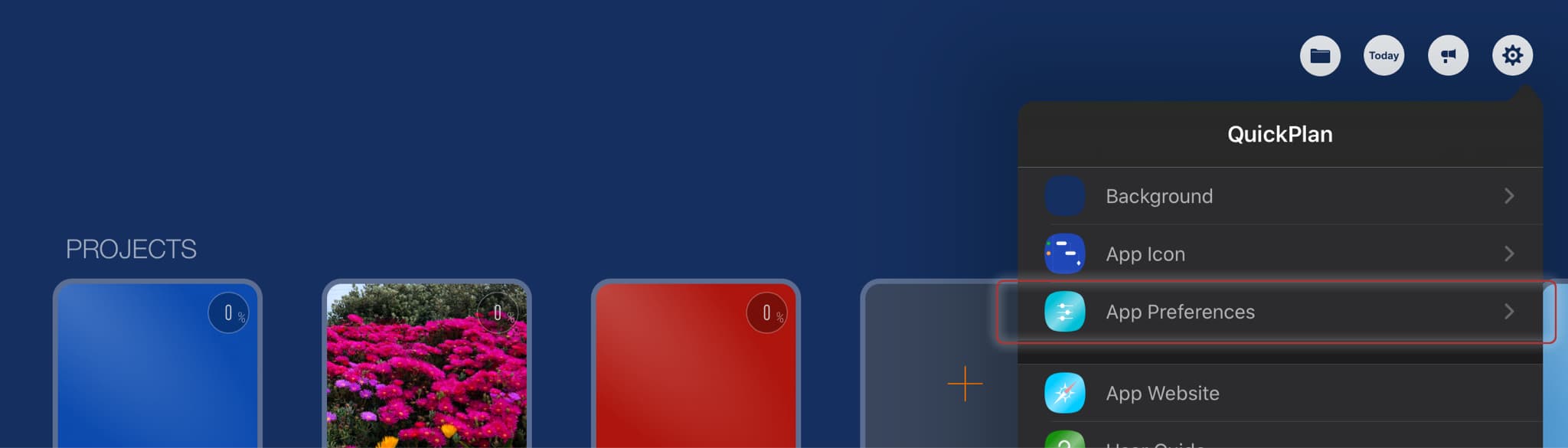
Sync via third-party cloud storages
"Files Integration" facilitates syncing projects across multiple devices using Dropbox, OneDrive, Google Drive, etc. Below is an example of syncing via OneDrive.
Troubleshooting
OneDrive controls file transfer; the app cannot influence when or how files are transferred.
OneDrive generally provides fast syncing. However, delays can occur.
- Ensure you are using the SAME OneDrive account on all devices.
- Go to the OneDrive website to verify that the project files have been transferred to the OneDrive server.
- To confirm synchronization, check the project files in the Files app or the OneDrive app on your iOS device.
- Check the file's last modification time on the device to confirm synchronization.
Notes:
Some users expect to edit the same project (opened from OneDrive) on multiple devices simultaneously, with changes automatically transferring. We emphasize that simultaneous editing on multiple devices via OneDrive is not possible.
Tasks in a project plan follow a tree structure with complex relationships, such as date constraints (links) and parent-child hierarchies.
Simultaneous editing of multiple tasks causes significant logical conflicts. Examples of potential issues include:
- (Device A): Add a task to a group; (Device B): Remove the same group.
- (Device A): Assign a member to a task; (Device B): Remove that member from project resources.
- (Device A): Change a task's date; (Device B): Move a successor to that task.
- (Device A): You see data change unexpectedly (e.g., task work updates "automatically"), assuming it's an error; (Device B): Another user is actively changing that data.
Projects Maintenance
Project Properties
Task Maintenance
Gestures & Keyboard Shortcuts
Customization
Synchronization
- Sync via iCloud Drive
- Sync via OneDrive
Team Collaboration
Project Sharing
- Sharing Project from iPad
- Import Project on iPad
- Sharing Project from iPhone
- Import Project on iPhone
- Sharing Project via AirDrop
- Sharing Project via Email
- Sharing Project via Dropbox
- Sharing Project via Google Drive
- Sharing Project via OneDrive
- Sharing Project via Box Cloud
- Sharing Project via 3rd Apps
Integrations
Others