
QuickPlan for iPad supports opening project files outside the app's sandbox via iOS Files integration.
- Opening a project file means accessing it directly outside the app's sandbox. You can modify the project externally if permissions allow.
- Opening a project differs from importing it. QuickPlan supports importing a file into the app's sandbox, where the file is copied (and converted if necessary). The original file remains unchanged.
This feature is disabled by default. Please enable it in the app settings.
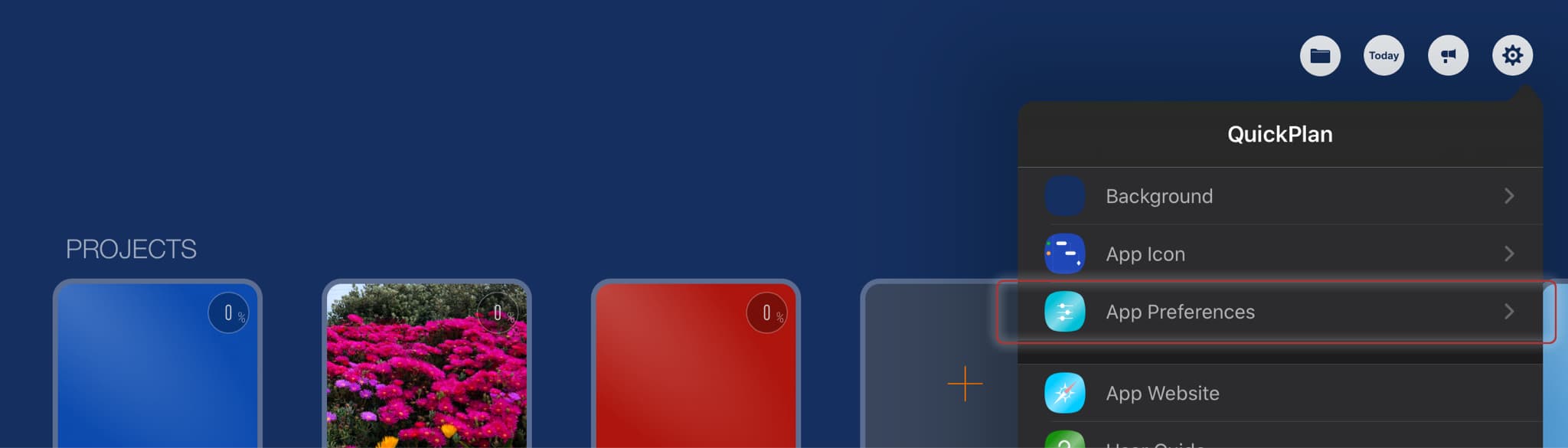
Open to Edit from Files
It is easy to open and edit a project file outside the app's sandbox. For example, to open and edit a project file on Google Drive:
Ensure you open the project file by tapping a QPP file within the QuickPlan app. Tapping the file from the iOS Files app (or any other app) imports the file rather than opening it directly.
Copy to Files
You can export a project to a selected location in the Files app. For example, copying a project to a OneDrive folder.
Sync via iCloud Drive
(Sync projects across multiple devices for the same user)
Prior to version 12.0, QuickPlan provided access to the internal iCloud Drive for syncing projects across devices. Version 12.0 introduced "Files Integration" as an alternative method to access project files in iCloud Drive.
Sync via third-party cloud storages
"Files Integration" facilitates syncing projects across multiple devices via Dropbox, OneDrive, Google Drive, etc. Below is an example of syncing via OneDrive.
Work in a team via iCloud Drive
Sync the same project among multiple users via iCloud Drive. See details.
Projects Maintenance
Project Properties
Task Maintenance
Gestures & Keyboard Shortcuts
Customization
Synchronization
Team Collaboration
Project Sharing
- Sharing Project from iPad
- Import Project on iPad
- Sharing Project from iPhone
- Import Project on iPhone
- Sharing Project via AirDrop
- Sharing Project via Email
- Sharing Project via Dropbox
- Sharing Project via Google Drive
- Sharing Project via OneDrive
- Sharing Project via Box Cloud
- Sharing Project via 3rd Apps
Integrations
Others